
You move a repo. Or you fold three repos into a monorepo. Or you rename a top-level folder from ~/dev to ~/projects.
Your filesystem is fine. Git is fine. Your code is fine.
But your AI coding sessions can quietly keep the old absolute path in their metadata, and then everything downstream feels inconsistent:
- “Resume” can’t find the thread you want
- a thread opens, but it can’t locate the working directory
- a write lands in the wrong place because the session’s idea of
cwdis stale
This post is about why that happens, why it’s not a moral failing, and how to make it boring again.
The WHY: cwd Is Part of Your Session State
Most of us treat the current working directory as a boring detail.
AI coding tools don’t get that luxury.
A session isn’t just a chat log. It’s a pile of assumptions. One of the biggest assumptions is: “which directory is this work attached to?”
That “where” shows up in practical places:
- what gets listed when you run a resume picker
- which repo the agent thinks it’s operating in
- whether a tool call that uses relative paths lands in the right project
When you move folders, the filesystem changes instantly.
But your session metadata doesn’t move with it. It can keep pointing at an absolute path that no longer exists.
What’s Actually On Disk (The Two-Places Problem)
In Codex-style local workflows, your sessions typically live in two places:
- JSONL rollout files (the append-only event log of the session)
- A local SQLite database that acts like an index for listing, filtering, and UI convenience
If you only update one and not the other, you can end up with a weird split-brain situation.
Here’s a toy model of the failure:
JSONL says:  cwd=/home/alina/projects/payments
SQLite says: cwd=/home/alina/dev/payments
Depending on which store a specific screen or command is using, you’ll see different “truths”:
- the session file exists, but the UI doesn’t list it
- the database lists a session, but points at paths that are now wrong
Real-World Failure Modes (Not Hypothetical)
Here are a few failure modes that show up in the wild.
1) “Current working directory missing” after a repo move
You moved a project folder because that’s normal maintenance.
But the session still points at the old path. The UI can detect the folder is gone, and you get stuck with a thread that can’t be relinked.
2) The tool becomes unusable when the directory is moved mid-session
On Windows/WSL setups, moving the directory a tool started in can turn into repeated “no such file or directory” errors.
Not because you did something exotic.
Because cwd is a live dependency.
3) “Resume” behavior feels inconsistent across projects
Some people expect “resume” to naturally scope to the repo they’re currently in.
Others want a global list.
Either way, it’s clear that cwd is doing real work behind the scenes, and stale values make the whole experience feel arbitrary.
4) Edits land in the wrong place
If a session’s cwd disagrees with “the workspace I meant,” you can end up writing patches into the wrong repository.
That’s not a UX nit. That’s a trust problem.
The Engineering Lens: This Is a Migration Problem
Once you see it, it’s mundane. You have old absolute paths. You have new absolute paths. What you need is (1) a deterministic mapping, (2) validation so you don’t rewrite into nonsense, and (3) an audit trail because trust comes from being able to inspect what changed.
This is the same mental model as migrating a database column. You don’t “just change strings.”
You run a migration with checks.
A Practical Fix: codecom
We built codecom for one narrow job: safe, local-first Codex session migration after repo/folder moves.
It stays intentionally narrow: migration and discovery, with safety checks and an audit trail.
What it does is intentionally boring:
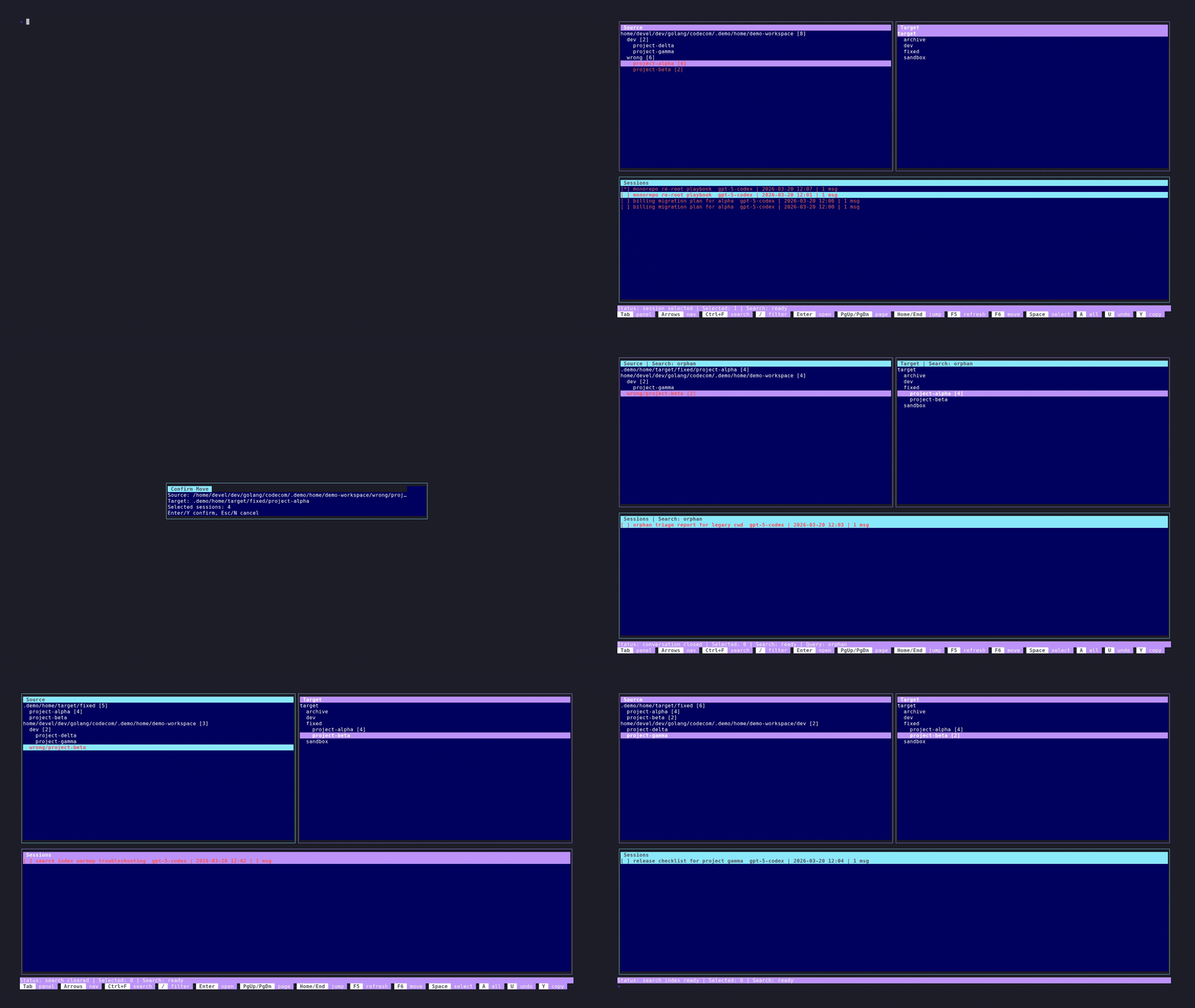
scanis read-only, and it flags “orphaned” sessions whosecwdpath no longer exists- the TUI move flow is explicit and confirmed, and it remaps
cwdfrom a source root to a target root - it rewrites both the JSONL session metadata and the local SQLite thread paths so listing and resume behavior stay aligned
- it commits changes with Git so you can inspect and revert them
If your repos move often, the goal is simple:
Make session portability boring.
How You’d Use It (3 Steps)
- Run a scan to see what’s broken.
- Use the TUI to select a source root and a target root.
- Confirm the move, then inspect the Git commits in your local Codex data directory.
Keybindings Cheat Sheet
F5: refresh (full rescan)F6: move selected sessions (confirmed)Space: toggle selection for a sessionA: select all sessions in the current source folderCtrl+F: conversation search
Repo: https://github.com/apiculallc/codecom
References (Links)
If you want the “I’m not imagining it” version, here are public issues that rhyme with the problems above:
- Desktop can’t recover a moved project (“Current working directory missing”): https://github.com/openai/codex/issues/12679
- CLI breaks if the working directory is moved/removed mid-session (Windows/WSL): https://github.com/openai/codex/issues/2252
- Resume scoping/filtering expectations tied to repository/
cwd: https://github.com/openai/codex/issues/6730 - Workspace/CWD mismatches can cause writes in the wrong repo: https://github.com/openai/codex/issues/3749
- JSONL sessions exist but UI doesn’t list them due to SQLite/index divergence: https://github.com/openai/codex/issues/16385
Codex is a product name used by OpenAI. codecom is an independent open-source tool built to help with local session migration workflows.